
Brandworkz 10.9 Release Notes
We're pleased to announce Brandworkz 10.9! This release focuses on a major upgrade to how Groups are managed in Brandworkz, giving administrators faster control and visibility. Alongside this, we've made several improvements to Workflows, the DAM, and general platform stability based on your feedback.
What's New:
- Groups redesigned: Manage membership, permissions, and group details with faster navigation.
- Smarter exports: Export group members or the brand-new sitemap permissions via Excel or CSV, including several groups at once. This can all be done from the Groups list.
- More reliable workflows: A round of fixes addressing client-reported issues across the approval process.
- DAM fixes: Smoother bulk uploads, asset versioning, and sort order behaviour.
- CMS fixes: Improvements to page building, anchor links, and dynamic templates.
Groups Management Redesigned
We've completely rebuilt the Groups area with a modern, more intuitive interface. Administrators can now manage every aspect of a group from one place, with a cleaner layout and faster navigation.
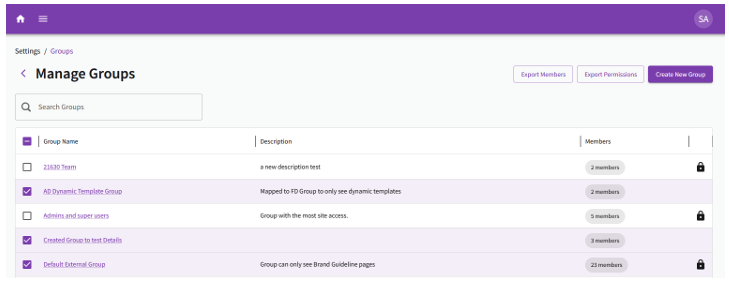
Group List Page
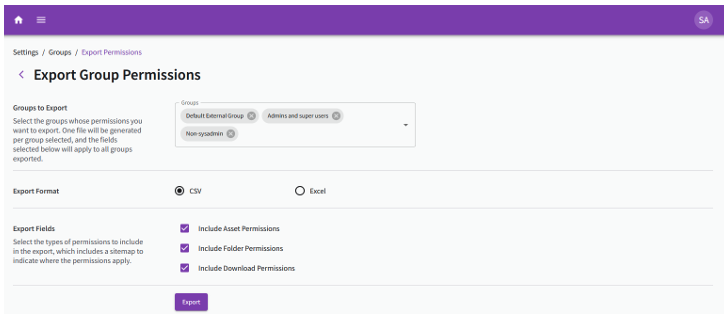
The main Groups listing has been rebuilt around a modern, sortable table so you can find what you need at a glance, with Group Name, Description, member count, and lock status all in one tidy view. Based on feedback, administrators can now export a full list of group members, or a group's permissions directly from the Group listing page. We’ve also included the option to select more than one group at a time for bulk exporting. This makes auditing and reporting much easier, particularly for larger teams or regular audits. Find more information in the Export Members & Permissions section.
Group Edit Page Tabbed Layout
Each group now has a dedicated edit page with four tabs, so related settings are grouped together and easier to find:
- Members - see and manage who belongs to the group
- Permissions - control what the group can access
- Workflow - assign Workflow approvers for the group
- Details - view metadata and group information
Membership Tab
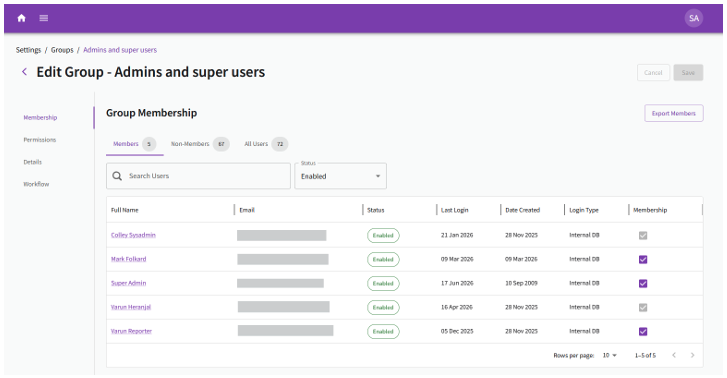
The Members tab makes it simple to see and manage who belongs to a group.
- Add or remove people with a single tick box instead of fiddly actions. Unsaved changes are clearly flagged until you save.
- Guardrails prevent users from being accidentally removed if they're a group's workflow approver or only belong to that group.
- See each person’s status (Active, Pending, or Disabled) quickly, with a filter to match. This is useful for reviews and audits.
- Jump straight to a user’s profile from their hyperlinked name in the table.
- Export the full member list when you need a record. Users with the "Create / Modify Groups" role can manage group membership for any user, excluding System Admins. The member list export is restricted to System Admins only.
Permissions Tab
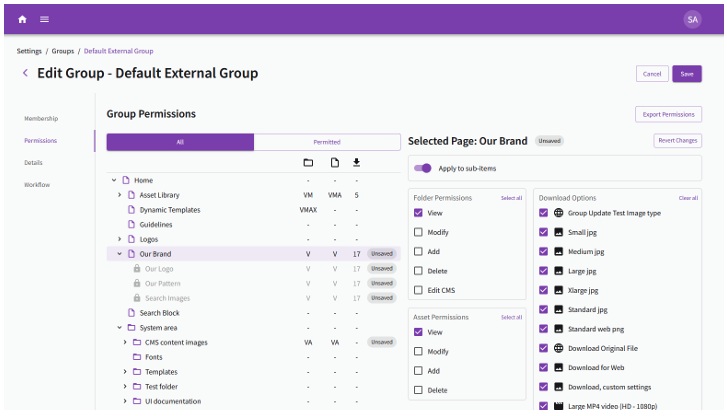
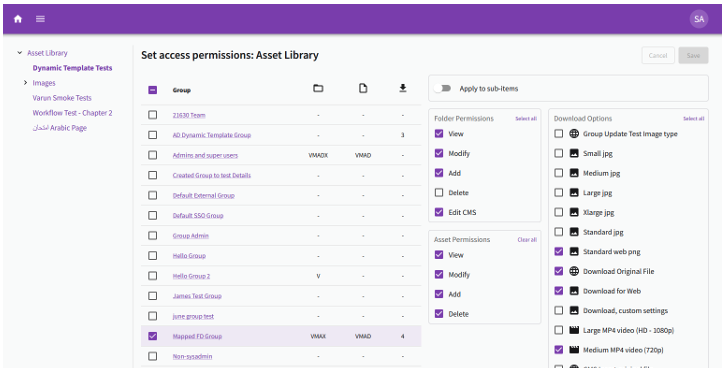
The Permissions tab now consolidates the access and download permissions into one screen, so you can set permissions without navigating between pages.
- View the whole sitemap or just the areas a group can already access.
- Set folder, asset, and download permissions side by side, with clear icons and scannable summaries of what’s been granted.
- Apply a folder’s settings to its children in one step, with safeguards that prevent accidental changes.
- Unsaved edits are clearly marked, and you can undo changes on any item before saving.
Please note that users with the “Create / Modify Groups” role will be able to apply any access or download permissions for a group.
Details Tab
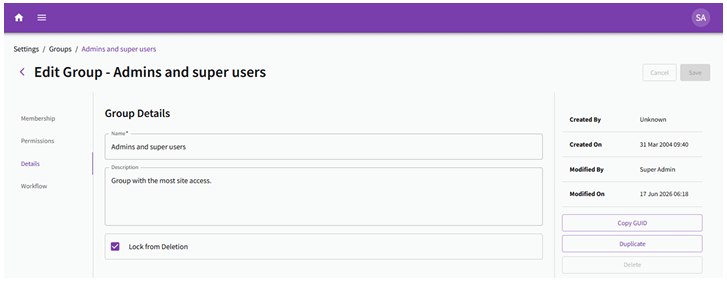
The Details tab brings together a group’s name, description, and metadata, including who created it and when it was last changed, to help with record-keeping. From this page you can also copy the group’s ID, duplicate a group (choosing exactly what to carry over), or delete it. Groups marked as locked can’t be deleted by accident, and we always confirm before removing anything.
Export Members & Permissions
Along with implementing bulk exports from the Group listing page, we’ve improved the Member export experience and built Permissions export functionality. These include:
- Export to Excel or CSV. The older format has been retired in favour of these more flexible choices.
- Choose exactly which details to include, grouped into clear sections.
- Bulk export several groups at once, with each group exported producing its own clearly named file.
- A progress window keeps you informed and lets you download each file as soon as it’s ready.
Please note that only users with a “System Admin” role can export Members.
Edit Permissions in the DAM or CMS
The “Set Permissions” feature in the admin bar of DAM and CMS pages has also been updated with a new look. We’ve included the ability to set the download options from here, which mirrors the Edit Permissions UI in the Group Edit page.
Beta Features
We are rolling out two new features to the Brandworkz system: Identity Gateway and AI Knowledge Assistant. Contact your Sales Representative if you'd like to participate.
Identity Gateway
Identity Gateway gives your organisation a single, branded access hub that connects users seamlessly across all your Brandworkz sites - with the controls your teams need and the experience your users expect.
- Multi-brand, one portal: Surface all your sites as clean, clickable cards under one roof. Users see exactly what they can access - nothing more.
- Your brand, not ours: Set your colours, logo, favicon, and portal name. Identity Gateway fades into your brand identity.
- Granular access control: Delegate site-level administration without giving up organisation-wide oversight. The right people have the right keys.
AI Knowledge Assistant
Ask anything about your brand and get the answer in seconds. The assistant reads your approved Brandworkz content and surfaces answers conversationally, hosted on our secure cloud infrastructure.
The v1 assistant is live. What comes next is being defined right now, and early adopters get a seat at the table.
Workflow Improvements
This release includes a number of fixes to Workflow that address issues reported by clients, improving reliability and consistency throughout the approval process.
Fixed: Deleting a Workflow Now Works as Expected
Previously, deleting a workflow did not fully remove it from the system. This has now been resolved.
Fixed: Approval Email Links
Email links sent during the approval process were sometimes directing users to the wrong stage. These now correctly route users to the right point in the workflow.
Fixed: Radio Button Metadata
Radio button fields set as mandatory were not always enforcing that requirement during workflow. This has been corrected.
Fixed: Workflow Stuck After Radio Button Selection
In some cases, a workflow could become unresponsive after a radio button was selected. This has been resolved.
DAM Fixes
Fixed: Save & Next Now Respects Sort Order
When editing assets, the Save & Next button now follows the same sort order shown in the DAM, so you move through assets in the order you'd expect. The button also now appears correctly on the first asset in a set.
Fixed: Bulk Upload File Drop-Out
Files were occasionally dropping out during a bulk upload. This has been resolved and uploads now complete reliably.
Fixed: Unable to Upload a New Version of an Asset
Some users were encountering an error when trying to upload a new version of an existing asset. This is now fixed.
Fixed: Unable to set Folder Sort Order
Setting the Folder Sort Order on folders with lots of sub folders sometimes caused an error. This has now been fixed.
CMS Fixes
Fixed: Anchor Links on Pages
Anchor links were not displaying correctly on certain pages. These now appear and function as expected.
Fixed: Unable to Add Blocks to a Page
Some users were unable to add content blocks to pages. This has been resolved.
Fixed: Dynamic Template CSRF Issue
A security-related issue when saving Chili templates has been resolved.
Fixed: Dynamic Template Annotations
Some users faced issues when trying to view annotations on iterative stages
Fixed: Dynamic Template Artwork Performance Issue
We’ve added pagination to prevent performance issues for templates with a high load of artworks.
Looking forward
We're thrilled with these improvements and beta features, but we're not stopping there. We're already working on modernizing our Search functionality and API endpoints. In the meantime, please submit any product ideas or requests to customer services at support@brandworkz.com or your account manager.