
Brandworkz 10.8 Release Notes
We’re pleased to announce the release of Brandworkz 10.8, which lays the groundwork for our upcoming Identity and Access Management (IAM) capability, launching soon. This release represents an important step forward in strengthening the platform’s foundations and preparing for more advanced security and access controls.
Moving to the new IAM model will introduce enhanced security features, giving you greater confidence and control over how users access and interact with the system. It will also enable us to deliver a significantly improved experience for multi-brand clients, with more flexible and scalable ways to manage users across brands, regions, and business units.
While much of the work in 10.8 has taken place behind the scenes to support this transition, you will begin to see and benefit from several practical improvements in this release. These enhancements focus on performance, usability, and consistency, ensuring the platform is faster, more intuitive, and better equipped to support your evolving needs.
Below is a summary of the key updates included in this release and how they can benefit you.
User Management Area
We’ve optimised the technology underpinning the User Management area. For those of you managing large numbers of users, this means faster load times and a more responsive experience.
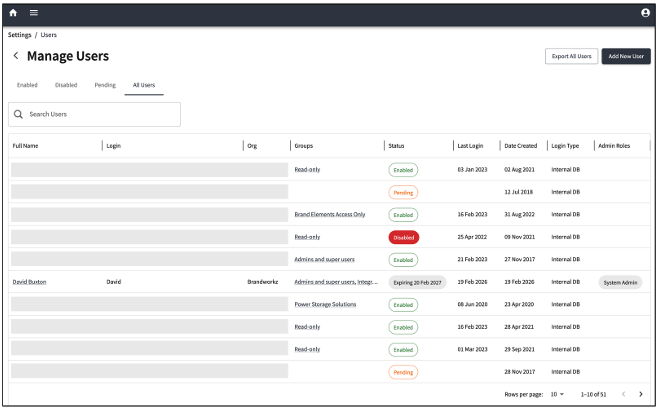
At the same time, everyone will benefit from a cleaner, modernised interface. The Manage User Listing and Edit User pages have been refreshed to provide a more intuitive, streamlined experience, making it quicker and easier to manage your users.
Some notable changes:
- The top navigation bar now takes the brand colour from the Settings > Brand and Skinning > UI Colours menu
- The user table has been modernised to make user information visually clearer and easier to browse
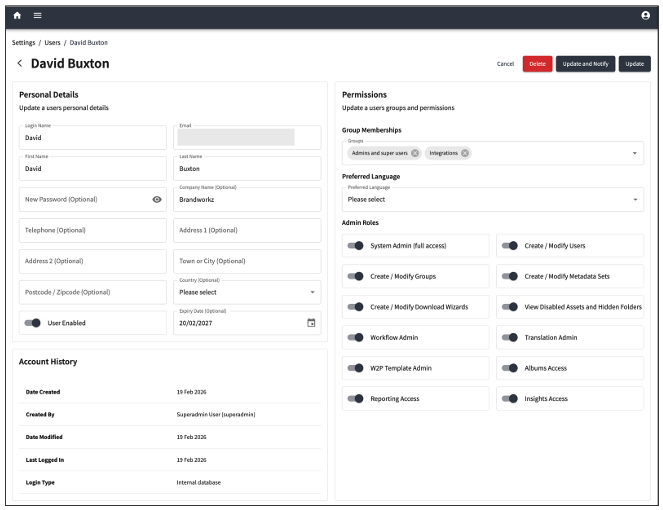
Edit Users Screen
Some notable changes:
- The top navigation bar now takes the brand colour from the Settings > Brand and Skinning > UI Colours
- The page displays breadcrumbs to make it easier to navigate through the Settings screens
- The layout of the page has been updated:
- The “Personal Details” section now includes organisational details, as well as options to enable the user and set the user’s expiry date
- The “Account Info” section has been moved under the “Personal Details” section
- The “Preferred Language” option has been moved into the “Permissions” section
My Profile Section
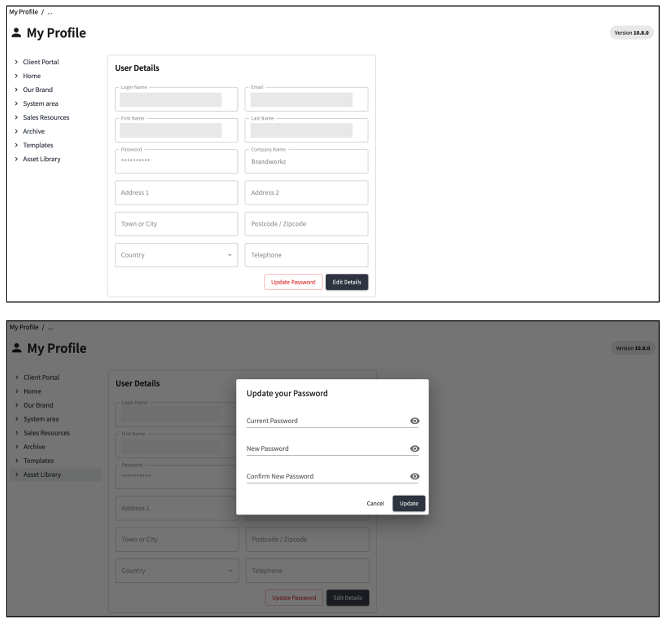
We’ve updated the My Profile page to provide a more modern look and feel with subtle improvements to the user experience when updating user details or changing a password.
Some notable changes:
- The top navigation bar and the toggles on the page now take the brand colour from the Settings > Brand and Skinning > UI Colours
- The User Details form has been updated to have a more modern look
- Users can now update their password via the “Update Password” button
System Settings
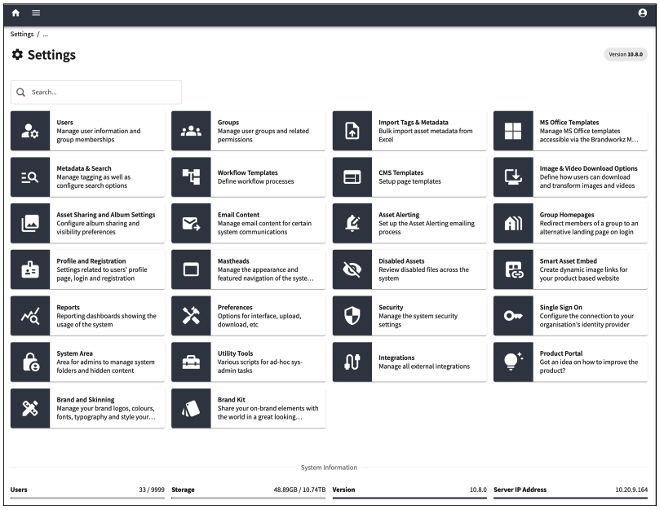
The System Settings page has been refreshed with the same modern UI enhancements introduced in the User sections. We’ve also updated the settings header bar and navigation to deliver a more streamlined and functional user experience.
Looking Ahead
We're thrilled with these improvements and will share more information about our new IAM model soon.
In the meantime, please submit any product ideas or requests to customer services at support@brandworkz.com or your account manager.